
I am certainly no expert on style, but I always love to search through blogs and pinterest for inspiration. I do all these things because I really want my blog to be aesthetically pleasing and enjoyable to visit.
Obviously there are more important things to think about than just the design. Your blog could be as pretty as the stars and have terrible & empty content. Likewise your content could be amazing and be overlooked due to your poor blog layout & design.
Today I've picked out three incredibly basic template design choices and listed the do's and don'ts of each one. To some people these might seem incredibly obvious, and that's okay! But to others they might be exactly what they need to give their blog design a reboot. If your blog suffers from any of these design faux pas, don't despair! They're all an easy fix! I'm here to help.
Illegible & Unattractive Blog Headers
Your blog name is very important, it is your brand and it's what people see as soon as they come onto your main page. You want it to be lovely and memorable.
Don't:
- Use a font that's difficult to read
- Use a font & font colour on an image so that your name is hard to see
- Upload an image and then have blogger automatically put text in front of it
- Use a default blogger header
Do:
- Pick a font that's easy to read and suits your blog style (Dafont has free fonts!)
- Create & upload a header that is an image that has the text attached (guide)
It's easy to create a lovely header for your blog in a variety of programs and websites. There are many different styles and designs to choose from, whether you want to have your blog name on a photo or just have a beautiful font. Make your blog stand out, it's the first thing a reader is going to see.
Crazy Post Text
I want to read your content, that is why I'm on your blog. So I kind of need your text to be large enough for me to read, visible against your background and a font that doesn't consist completely of squiggles.
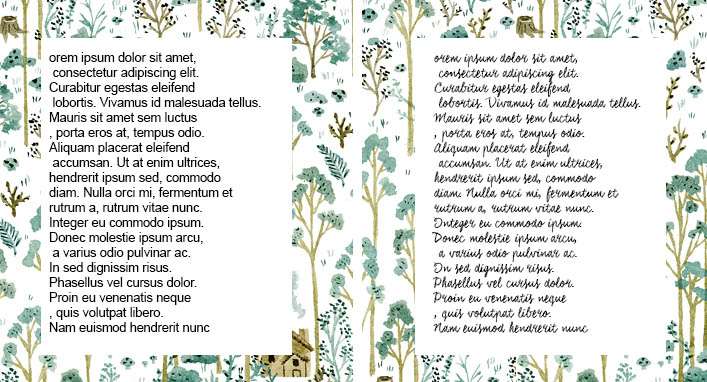 |
| Good vs Not So Good |
Don't:
- Use a coloured font. .
- Use a decorative font.
- Don't make your text this small
Do:
- Have your post text black or grey. Save the colours for your header or sidebar headers.
- Use a traditional and easy to use font, helvetica, raleway, georgia, verdana. No one is going to fault you for going too basic with your base font.
- Keep your text at reasonable size, between 11-15px as a min-max size.
Simple doesn't mean boring, it just means a little bit easier and a lot less effort to read.
(guide on changing fonts/sizes/colours on blogger)
Super Patterened & Non-Seamless Backgrounds
What I mean by non seamless backgrounds is when you choose and image for your background and you have it repeating. But the image isn't seamless so it has a clear edge, and when it repeats it is very visible. Super patterned backgrounds are completely fine as long as they aren't actually underneath the text you're trying to read.
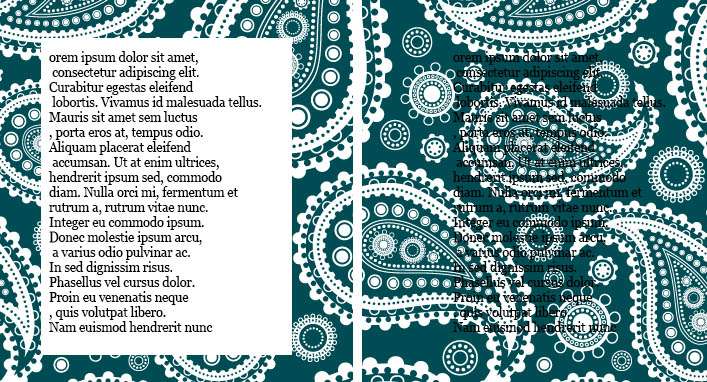 |
| Good vs Not So Good |
I know you love your background. But do you really want it to be the only thing your reader can see?
You can also find some sweet seamless backgrounds to use here.
You can also find some sweet seamless backgrounds to use here.
Some Final Tips
- White space is your friend. You don't need to fill every inch of your blog with stuff.
- You don't have to commit to a header or a font straight away, keep changing it up until it's something you love.
- Decide on a colour scheme and adapt it to everything. I would only choose a maximum of 5 different colours. Mine are black, grey, white and gold. What can I say I love monochrome.
- Have a maximum of 5 different fonts on your blog. So everyone doesn't get visually confused. Use the fonts for everything. Make it your signature brand and style!
- Don't be afraid to start from scratch with your template. Clear the fonts/colours/backgrounds and start fresh!
- Most of all love your blog! Love how it looks! It is yours after all!
Cya! xx
**If you need some help creating a blog header or making sure it's the right size for your blog, you can drop me a line at tegans.home.blog@gmail.com
More from Blogging 101:
- The Sidebar
- Creating a Photo Header
- Setting out a Blog Post
- Add Your Blog Link to Comments
- Create a Favicon for Your Blog
- How to Remove the Frame on Bloglovin'
